
Turn PDFs, scans and images into clean Excel data.
Upload your documents. We extract, clean and organize your data into a professional Excel or CSV file.
| Description | Qty | Unit price | Amount |
|---|---|---|---|
| Office chairs (K2) | 4 | 120.00 | 480.00 |
| Standing desk frame | 2 | 310.50 | 621.00 |
| Monitor arm, dual | 3 | 64.90 | 194.70 |
| Total ✓ verified | 1,473.20 |
Fictional example. Wrapped rows joined, decimal comma fixed, numbers stored as real numbers, total checked.
Four steps. You only do the first one.
Upload
Choose a plan, drop your PDFs, scans or photos, and tell us what you need.
Extract
We detect each table, read digital and scanned pages, and rebuild rows and columns.
Clean & verify
Formats normalized, duplicates removed, totals cross-checked. Uncertain values are reviewed by a person.
Download
Receive an email with your Excel, CSV or Google Sheets-ready file. Free revision included.
What “clean data” means here
Structured
Tables recognized and separated, one header row, columns identified and organized, multi-page tables joined.
Normalized
Numbers you can sum, dates in one format, phone numbers and emails standardized, whitespace and empty rows removed.
Verified
Duplicates detected, totals compared with their rows, inconsistent and uncertain values flagged and checked before delivery.
Before → after
Invoice → Excel
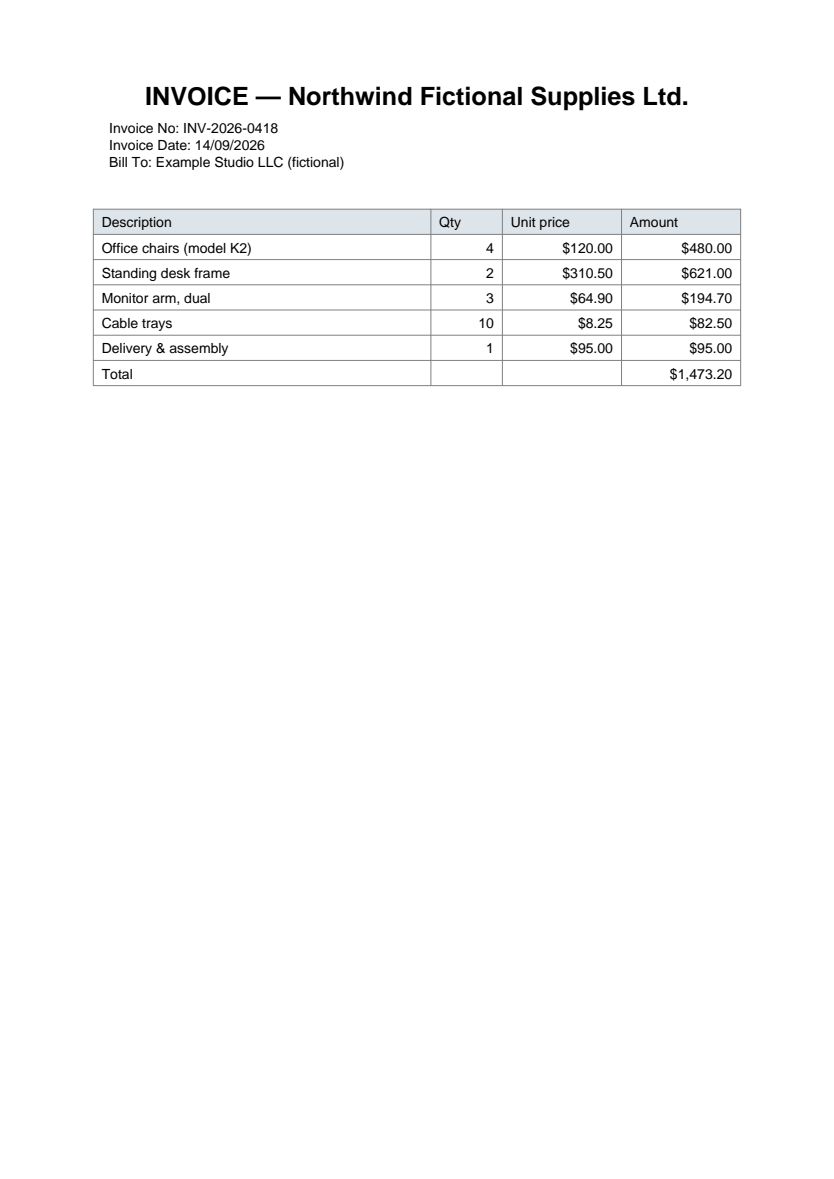
| Description | Qty | Unit price | Amount |
|---|---|---|---|
| Office chairs (model K2) | 4 | 120.00 | 480.00 |
| Standing desk frame | 2 | 310.50 | 621.00 |
| Monitor arm, dual | 3 | 64.90 | 194.70 |
Scanned table → Excel
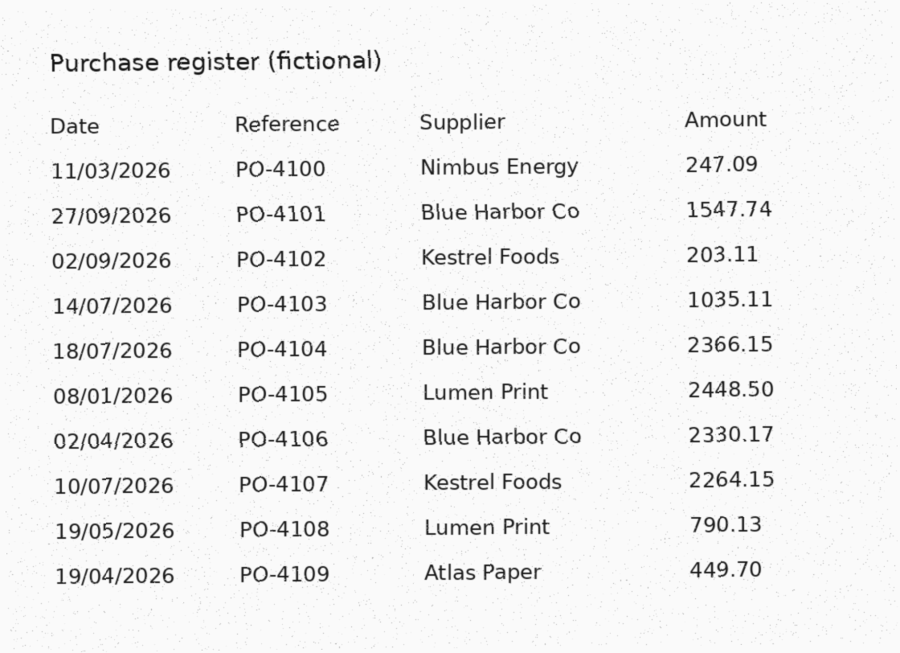
| Date | Reference | Supplier | Amount |
|---|---|---|---|
| 2026-03-11 | PO-4100 | Nimbus Energy | 247.09 |
| 2026-09-27 | PO-4101 | Blue Harbor Co | 1,547.74 |
| 2026-09-02 | PO-4102 | Kestrel Foods | 203.11 |
Product list → Excel
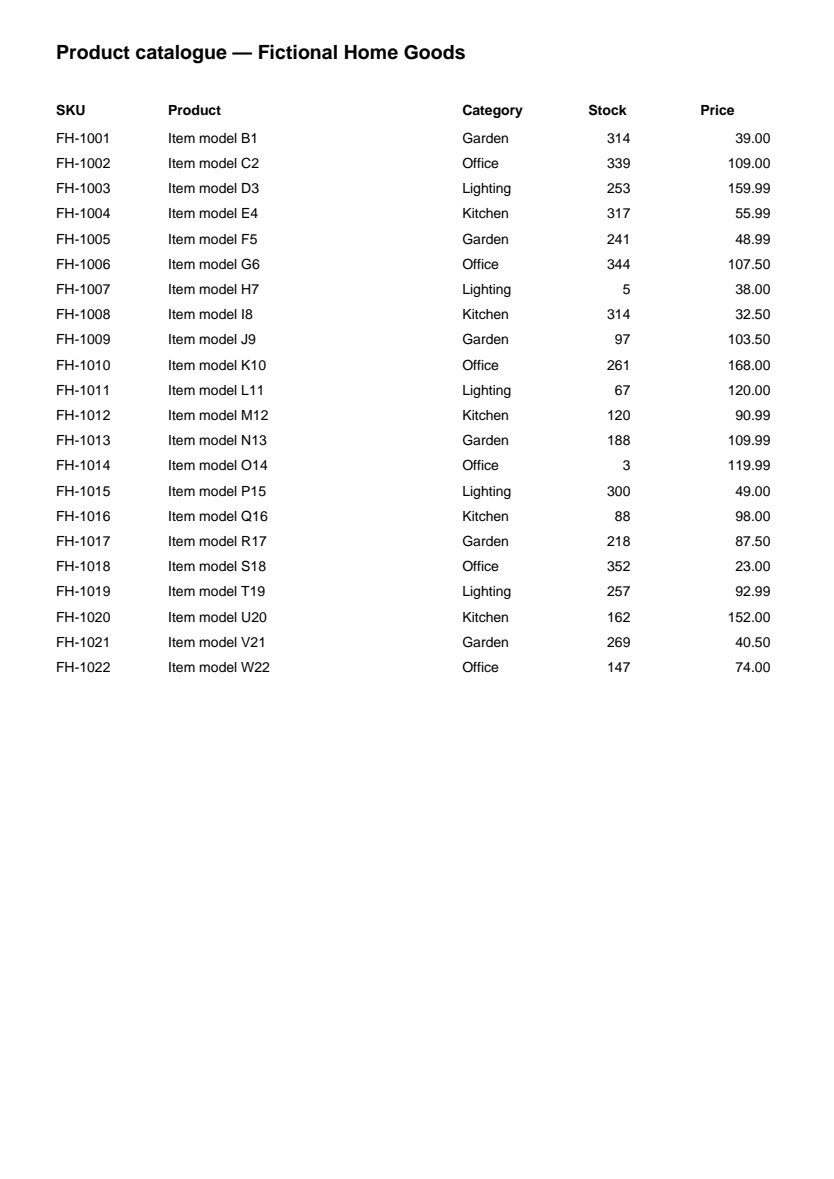
| SKU | Product | Category | Stock |
|---|---|---|---|
| FH-1001 | Item model B1 | Garden | 314 |
| FH-1002 | Item model C2 | Office | 339 |
| FH-1003 | Item model D3 | Lighting | 253 |
All examples use fictional documents created for demonstration.
Simple prices per order
Starter
- Up to 5 pages
- PDF or image → Excel or CSV
- Table extraction
- Quality check before delivery
- 1 free revision
Business
- Up to 20 pages
- Extraction + cleaning
- Column organization
- Consistent formatting
- Verification before delivery
- 1 free revision
Professional
- Up to 50 pages
- Advanced cleaning
- Duplicate detection
- Date, number & phone normalization
- Verification before delivery
- Excel + CSV delivery
- 2 free revisions
Custom Order
More than 50 pages, recurring batches or unusual documents. Send a sample and get a quote.
Every order is quality-checked. Uncertain values are verified by a person before delivery. We never promise 100% accuracy without that check — and if something is wrong, a free revision fixes it.
Every value gets a confidence score
Each extracted cell is scored. Clear documents pass straight through. When a value is uncertain — a faint digit, an ambiguous date, a total that does not add up — it is read a second time, and if doubt remains, a person checks it against your original before anything is sent.
High confidence Extra verification Human review
Your documents stay yours
Encrypted connections, access-controlled storage, automatic deletion after 30 days, and a button to delete your files immediately. Your data is used only to complete your order. Privacy policy.
Questions
Where is my order?
Open the tracking link from your confirmation email, or enter your order number and email on the Track order page. You will see every step: payment, processing, quality check and delivery.
How long does it take?
Starter and Business orders are delivered within 24 hours, Professional within 48 hours. Most clean documents are ready much sooner. Files that need extra verification can take the full delay — we would rather check than deliver wrong numbers.
Which formats do you accept?
PDF (digital or scanned), PNG, JPG/JPEG, TIFF and WEBP, up to 25 MB per file. We deliver Excel (.xlsx), CSV, or a Google Sheets-ready workbook (open it with File → Import in Google Sheets).
How do I send my files?
Choose a plan, then upload your files on the order page (drag and drop or click). You can add instructions such as which columns you need or which pages to skip.
How do I request a revision?
On your order tracking page, click 'Request a revision' and describe what should change. Revisions included in your plan are free.
How do I get an invoice?
Once your order is paid, an invoice link is available on your order tracking page. You can print it or save it as PDF.
Stop retyping. Start using your data.
Upload now — usually delivered within 24 hours, up to 48 hours for large Professional jobs.
Get Started